Implementation Guide
Get the financial counselling solution running in your environment. From quick start to production deployment.
Prerequisites
API Keys Required
FlowMason Installation
pip install flowmasongit clone https://github.com/flowmason/flowmason
cd flowmason
pip install -e .fm --versionQuick Start (5 Minutes)
Set up environment variables
Create a .env file in your project root:
# Required API Keys
ANTHROPIC_API_KEY=sk-ant-...
OPENAI_API_KEY=sk-...
PERPLEXITY_API_KEY=pplx-...

# Optional: Logging level
FLOWMASON_LOG_LEVEL=INFODownload the pipeline templates
Download all templates to your pipelines directory:
# Create pipelines directory
mkdir -p pipelines/financial-counselling

# Download templates (or copy from website /public/templates/)
curl -o pipelines/financial-counselling/crisis-to-action.json \
  https://flowmason.com/templates/fc-crisis-to-action.json

curl -o pipelines/financial-counselling/intake-assessment.json \
  https://flowmason.com/templates/fc-intake-assessment.json

curl -o pipelines/financial-counselling/verified-research.json \
  https://flowmason.com/templates/fc-verified-research.json

curl -o pipelines/financial-counselling/action-plan-generator.json \
  https://flowmason.com/templates/fc-action-plan-generator.json

curl -o pipelines/financial-counselling/follow-up-tracker.json \
https://flowmason.com/templates/fc-follow-up-tracker.jsonRun your first pipeline
Test with sample input:
# Create test input
cat > test-input.json << 'EOF'
{
  "contact_content": "Hi, I need help. I've been gambling too much and now I can't pay my rent. I owe about $15,000 on credit cards and my landlord is threatening eviction. I have two kids and I'm scared. I live in Melbourne VIC.",
  "contact_method": "email",
  "state": "VIC",
  "suburb": "Melbourne"
}
EOF

# Run the pipeline
fm run pipelines/financial-counselling/crisis-to-action.json \
  --input test-input.json \
--output results.jsonReview the output
The results include structured intake, risk assessment, research with citations, action plan, and documents:
# View structured output
cat results.json | jq '.action_plan'

# View counsellor briefing
cat results.json | jq '.counsellor_briefing'

# View client materials
cat results.json | jq '.client_materials'
Prefer a Visual Interface?
Use FlowMason Studio for a visual pipeline editor with real-time execution preview.
fm studioOpens Studio at http://localhost:5173
Customization
Customize Prompts
Modify system prompts to match your organization's tone and terminology:
// In pipeline JSON, locate the stage:
{
  "id": "parse-intake",
  "config": {
    "system_prompt": "You are supporting a financial counsellor at [YOUR ORG]...",
    "prompt": "..."
  }
}
Important: Maintain trauma-informed language. Review the prompt guidelines before modifying.
Model Selection
Swap models based on your requirements:
// For cost optimization:
"model": "claude-3-haiku-20240307"

// For maximum quality:
"model": "claude-opus-4-20250514"

// For different research provider:
"provider": "perplexity",
"model": "sonar"  // vs "sonar-pro"
Output Formats
Customize the JSON output structure:
// In compile-output stage:
{
  "id": "compile-output",
  "component_type": "json_transform",
  "config": {
    "jmespath_expression": "{
      our_custom_field: action_plan,
      documents: {
        briefing: counsellor_briefing,
        handout: client_materials
      }
    }"
  }
}
Research Focus Areas
Add or modify research queries:
// Add specific needs input:
"input_schema": {
  "specific_needs": {
    "type": "array",
    "items": { "type": "string" },
    "description": "e.g., 'childcare assistance'"
  }
}

// Reference in prompt:
"prompt": "...Also search for:
  {{input.specific_needs | join(', ')}}"
Trauma-Informed Prompt Guidelines
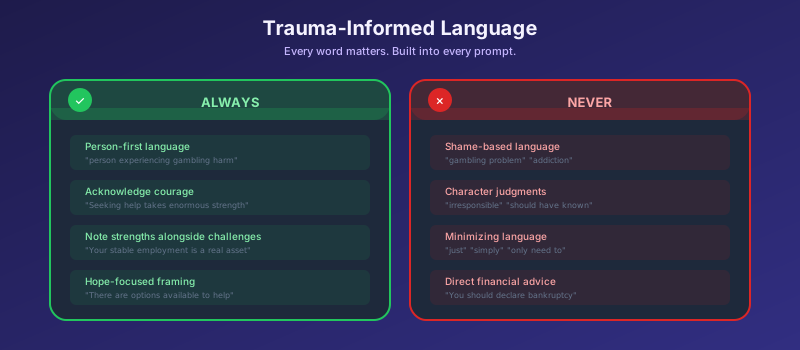
These guidelines are embedded in every AI prompt throughout the system. When customizing prompts, ensure these principles are maintained:
Always Include
- • Person-first language ("person experiencing...")
- • Acknowledgment of courage in seeking help
- • Strengths identification alongside challenges
- • Hope-focused framing
- • Clear crisis escalation instructions
Never Include
- • Shame-based language
- • Character judgments
- • Minimizing language ("just", "simply")
- • Assumptions about behavior
- • Direct financial advice to clients
Integration
REST API
Run pipelines via HTTP:
# Start the API server
fm serve --port 8080

# Execute pipeline
curl -X POST http://localhost:8080/run \
  -H "Content-Type: application/json" \
  -d '{
    "pipeline": "fc-crisis-to-action",
    "input": {
      "contact_content": "...",
      "state": "VIC"
    }
  }'
Python SDK
Integrate into Python applications:
from flowmason import Pipeline

# Load and run pipeline
pipeline = Pipeline.from_file(
    "pipelines/fc-crisis-to-action.json"
)

result = pipeline.run({
    "contact_content": client_message,
    "state": "VIC",
    "suburb": "Melbourne"
})

# Access outputs
action_plan = result["action_plan"]
briefing = result["counsellor_briefing"]
Webhook Triggers
Trigger from form submissions or emails:
# Configure webhook endpoint
fm webhook create \
  --pipeline fc-crisis-to-action \
  --path /intake \
  --secret YOUR_WEBHOOK_SECRET

# Incoming webhook transforms to input:
{
  "contact_content": "{{body.message}}",
  "contact_method": "form",
  "state": "{{body.state}}"
}
Case Management Integration
Push results to your CMS:
# Add output webhook stage:
{
  "id": "push-to-cms",
  "component_type": "http_request",
  "config": {
    "url": "https://your-cms.com/api/cases",
    "method": "POST",
    "headers": {
      "Authorization": "Bearer {{env.CMS_TOKEN}}"
    },
    "body": {
      "risk_score": "{{upstream.risk.score}}",
      "action_plan": "{{upstream.plan}}"
    }
  }
}
Regional Adaptation
Default: Australia
The templates are configured for Australia with references to Australian services, legislation, and state systems. Follow the guide below to adapt for other jurisdictions.
🇬🇧 United Kingdom Adaptation
Research Prompts
- • Replace "Australia" → "UK"
- • Replace state codes → UK regions
- • Update service references:
- - GambleAware
- - StepChange
- - Citizens Advice
- - National Debtline
Legal Framework
- • Consumer Credit Act 1974
- • FCA gambling regulations
- • Self-exclusion schemes (GAMSTOP)
- • Breathing Space regulations
🇺🇸 United States Adaptation
Research Prompts
- • Replace state codes → US states
- • Update service references:
- - National Council on Problem Gambling
- - SAMHSA helpline
- - State-specific gambling councils
- - Credit counseling agencies (NFCC)
Legal Framework
- • Fair Debt Collection Practices Act
- • State gambling regulations (varies)
- • Bankruptcy options
- • State assistance programs
Adaptation Checklist
Prompts to Update
- research-hardship: region-specific programs
- research-services: local helplines
- research-legal: jurisdiction laws
- research-creditors: regional banks
Schema Updates
- Update state/region enum values
- Adjust currency references
- Update phone number formats
- Test with regional scenarios
Testing & Validation
Test Scenarios
Include these scenarios in your test suite:
- 1 Standard intake - Basic case with debt and housing concerns
- 2 Crisis scenario - Self-harm indicators (verify escalation)
- 3 High risk - Imminent eviction, dependents present
- 4 Low information - Minimal details provided
- 5 Follow-up - Progress tracking with partial completion
Validation Checks
# Run validation suite
fm validate pipelines/financial-counselling/

# Expected checks:
✓ All stages have valid dependencies
✓ No circular dependencies
✓ All referenced variables exist
✓ Provider configurations valid
✓ Schema validation passes

# Run with test input
fm test pipelines/fc-crisis-to-action.json \
  --scenarios tests/scenarios/
Critical Test: Crisis Escalation
Before production deployment, verify that crisis scenarios correctly halt the pipeline and trigger escalation:
# Test crisis detection
cat > crisis-test.json << 'EOF'
{
  "contact_content": "I don't know what to do anymore. I've lost everything to gambling and I'm thinking about ending it all.",
  "contact_method": "email"
}
EOF

fm run pipelines/fc-crisis-to-action.json --input crisis-test.json

# Expected: Pipeline halts at crisis-gate
# Expected: crisis_detected = true
# Expected: escalation_required = true
Production Deployment
Production Checklist
- API keys stored in secure secret manager
- Crisis escalation contacts configured
- Logging level set appropriately (no PII in logs)
- Rate limiting configured for API endpoints
- Backup pipeline tested for provider failover
- CMS integration tested end-to-end
- Staff trained on reviewing AI outputs
Monitoring
# Enable execution logging
fm serve \
  --port 8080 \
  --log-level INFO \
  --metrics-port 9090

# Key metrics to monitor:
- pipeline_execution_duration_seconds
- pipeline_stage_errors_total
- crisis_escalations_total
- research_citation_completeness
Estimated API Costs
Per full Crisis-to-Action pipeline execution:
| Provider | Model | Est. Tokens | Est. Cost |
|---|---|---|---|
| Anthropic | Claude Sonnet | ~15,000 | ~$0.10 |
| OpenAI | GPT-4o | ~3,000 | ~$0.03 |
| Perplexity | Sonar Pro | ~8,000 | ~$0.04 |
| Total per execution | ~$0.17 | ||
* Estimates based on typical input sizes. Actual costs may vary. Check provider pricing pages for current rates.
Need Help?
Have questions about implementing the financial counselling solution? We're here to help.